
AI, Automation or Both: Where Should a Small Business Start?

AI, Automation or Both: Where Should a Small Business Start?

AI has become difficult to avoid.

New tools appear almost every week, existing software keeps adding AI features and businesses are regularly told that they need to start using it or risk being left behind.

That creates understandable pressure to do something. The trouble is that “we need to use AI” is not a particularly useful business objective.

A better place to start is with the problem you are trying to solve.

Perhaps enquiries are taking too long to answer. Your team may be spending hours copying information between systems. Important actions might be getting missed, or you may simply want to reduce the repetitive administration involved in running the business.

Once the required outcome is clear, you can decide whether the answer involves AI, automation, a combination of the two or simply improving the process you already have.

What is the difference between AI and automation?

AI and automation are often discussed together, but they perform different roles.

Automation follows predefined instructions. Something happens, a rule is applied and the system completes the next action.

AI is more useful when the work involves interpreting information, recognising patterns, working with language or producing a draft.

A straightforward way to think about it is:

  • Automation follows rules.
  • AI interprets information that may vary.
  • People provide judgement, context and accountability.

Many effective business processes use a combination of all three.

What is business automation good at?

Automation works particularly well when a task is repetitive and the required action can be clearly defined.

For example, when somebody completes an enquiry form, an automated process could:

  • Create or update their contact record
  • Send an acknowledgement
  • Notify the right person
  • Create a follow-up task
  • Add the enquiry to a sales pipeline
  • Issue a reminder if nobody acts within an agreed period

The system does not need to decide whether following up is a good idea. The business has already decided that every enquiry should be acknowledged and assigned to someone.

Other useful examples include appointment reminders, review requests, recurring tasks, internal notifications and moving information between connected systems.

Good automation removes avoidable administration and makes it easier for people to complete work consistently.

It is less successful when the rules are unclear or the process has so many exceptions that nobody can agree what should happen next.

What is AI good at?

AI becomes useful when the information changes from one situation to another and some interpretation is required.

That could include:

  • Summarising notes from a meeting
  • Producing the first draft of an email
  • Extracting key information from a document
  • Categorising an incoming enquiry
  • Identifying common themes in customer feedback
  • Suggesting ideas for an article or social media post
  • Turning a long piece of information into a shorter summary

These are tasks where the format, language or subject matter may vary.

AI can often complete the first stage quickly, but that does not mean its output should automatically be treated as accurate or ready to use.

A draft email can be checked before it is sent. A meeting summary can be reviewed against the original notes. A suggested category can be confirmed or corrected.
Start With The Problem

When should a small business use both AI and automation?

Many useful processes need a combination.

Imagine that a potential customer sends an enquiry containing several questions about your services.

Automation can capture the enquiry, create the contact record and send an immediate acknowledgement.

AI could summarise the message, identify what the person is asking about and prepare a first draft of a response.

A person still needs to consider whether that response is accurate, appropriate and commercially sensible.

Once the response has been approved, automation can record the next action, schedule follow-up and make any delay visible.

The complete process might look like this:

  1. The enquiry is received and recorded automatically.
  2. AI summarises or categorises the information.
  3. The enquiry is routed to the appropriate person.
  4. That person reviews it and decides what should happen.
  5. The next action and date are recorded.
  6. Reminders or escalations are triggered if the action becomes overdue.

Each part of the process is handled in the most appropriate way.

It also connects with the principles covered in our earlier article, What Should Happen After Someone Contacts Your Business?. A reliable process still needs an owner, a clear next action and a date, regardless of how much technology sits behind it.

How much human oversight does AI need?

The amount of human oversight should reflect the consequences of getting something wrong.

Using AI to produce an internal summary of a meeting presents a different level of risk from allowing it to send pricing information, respond to a complaint or provide advice to a customer.

Before allowing AI to complete a task without approval, consider:

  • What happens if the information is incorrect?
  • Could it affect a customer or member of staff?
  • Could it create a financial, legal or reputational problem?
  • Is the decision based on information the system may not have?
  • Does somebody need to take responsibility for the outcome?

For lower-risk tasks, a quick review may be enough. For important decisions, AI should support the person responsible rather than replace them.

The objective is to put checks in the places where mistakes matter.

Be careful what information you give to AI

It is easy to paste an email, document or meeting transcript into an AI tool without thinking about the information it contains.

That information could include customer details, confidential commercial information or personal data relating to employees and suppliers.

Before using an AI tool for business information, check:

  • Whether the tool has been approved for business use
  • How the provider stores and uses the information entered
  • Whether your data may be used to train its systems
  • What privacy and security settings are available
  • Whether confidential or personal information should be removed first

AI should be treated with the same care as any other business system. Convenience is not a good reason to ignore confidentiality, security or data protection.

Don’t automate a bad process

Technology cannot compensate for a process that nobody understands.

If enquiries are regularly missed because ownership is unclear, adding AI will not resolve the underlying issue. If a form asks for unnecessary information, automating it simply allows you to collect unnecessary information more efficiently.

Before introducing AI or automation, map what currently happens.

Identify:

  • What starts the process
  • Which information is required
  • Who is responsible
  • What decisions need to be made
  • Where delays occur
  • Which steps add value
  • What needs to be recorded
  • How completion is confirmed

You may discover that some steps can be removed before any new technology is introduced.

A simpler process is usually easier to automate, easier for people to follow and easier to improve later.

AI, automation or both? A simple way to decide

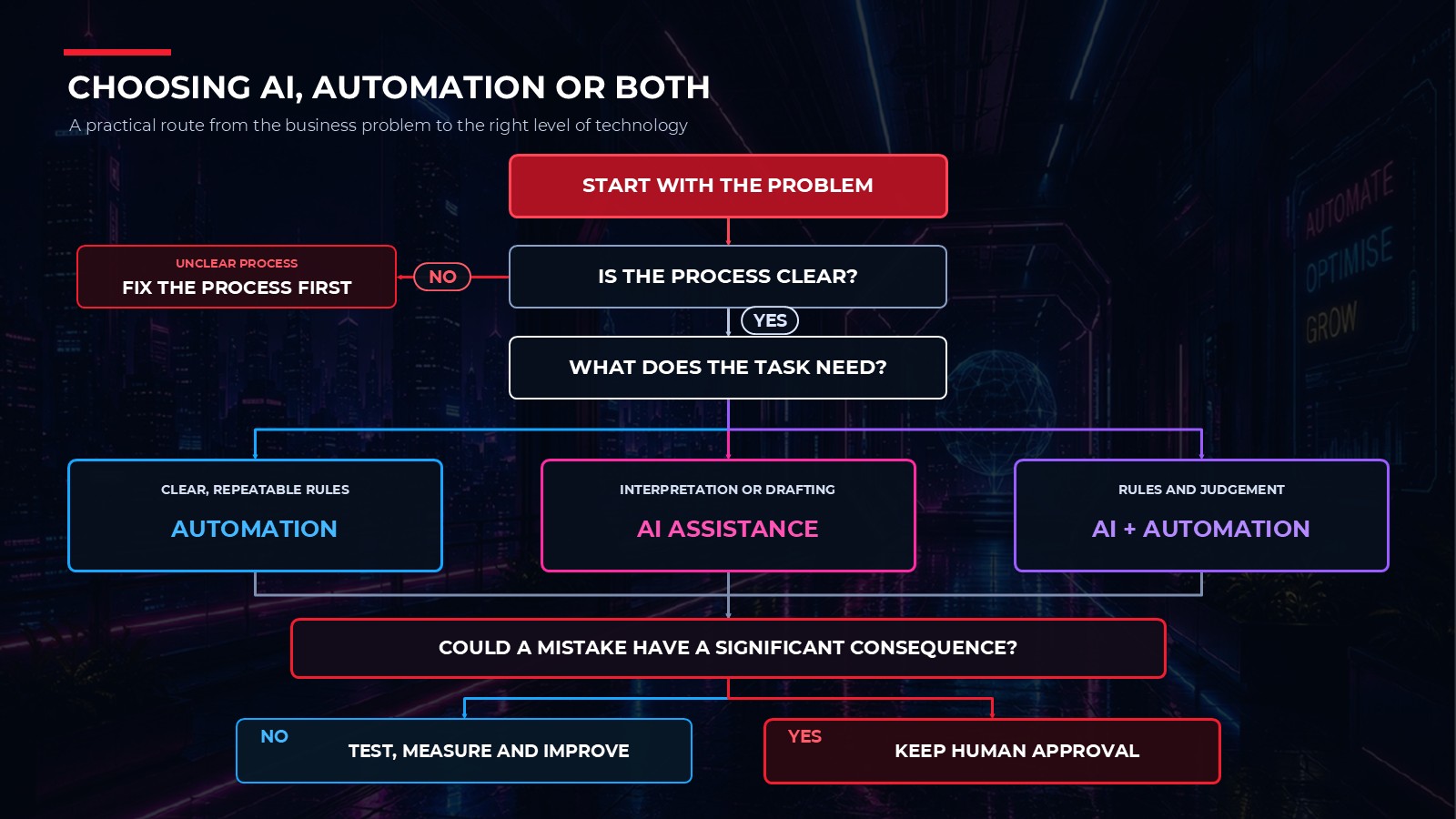
Consider the nature of the task, the information involved and the consequences of an error.

A rules-based task may be suited to automation. A task involving interpretation or drafting may benefit from AI. A process containing both elements may need a combination, with a person approving the important decisions.

If the existing process is unclear or inconsistent, fix that first.
Choosing AI, Automation or Both

Where should a small business start?

Start with one task rather than trying to transform the whole business.

A good first project is usually something that is:

  • Repetitive
  • Time-consuming
  • Completed frequently
  • Currently handled reasonably consistently
  • Easy to measure
  • Relatively low risk if the first version needs adjusting

You might choose the way meeting notes are summarised, how new enquiries are acknowledged or how overdue follow-up tasks are identified.

Write down what currently happens and ask:

  1. What problem are we trying to solve?
  2. Which parts follow clear rules?
  3. Which parts require interpretation?
  4. Where is human judgement necessary?
  5. What could go wrong?
  6. How will we know whether the change has helped?

That provides a much stronger starting point than choosing a tool first and then looking for somewhere to use it.

Find the right starting point for your business

AI and automation can save time, improve consistency and make useful information easier to access. They can also add unnecessary complexity when introduced without a clear purpose.

If everyday processes in your business take too long, rely heavily on memory or involve the same administration being repeated again and again, the first step does not have to be buying another piece of software.

We can help you map the existing process, identify where the problems occur and decide whether the solution lies in simplifying the process, making better use of your current systems or introducing appropriate automation or AI.

The objective is not to use more technology. It is to make the business work better.

Systems or Digital Marketing – Which Should You Fix First?

Systems or Digital Marketing – Which Should You Fix First?

Systems or Digital Marketing – Which Should You Fix First?

When a business wants to grow, the first response is often:

“We need more marketing.”

“More social media.”

“More advertising.”

“More emails.”

“More leads.”

Sometimes that’s true.

But after more than 40 years working with businesses and helping organisations get the best return from technology and systems, I’ve noticed something interesting.

Many businesses don’t have a marketing problem.

They have a systems problem.

The Real Question

Imagine your website generated twice as many enquiries next month.

What would happen?

Would every enquiry be:

  • Contacted quickly?
  • Recorded properly?
  • Assigned to the right person?
  • Followed up consistently?
  • Tracked through to a sale?

Or would some inevitably fall through the cracks?

For many businesses, growth isn’t limited by lead generation.

It’s limited by what happens after the lead arrives.

The Hidden Cost Of Disconnected Processes

Most businesses gradually accumulate tools over time:

  • Website forms
  • Email software
  • Spreadsheets
  • Calendars
  • CRM systems
  • Social media platforms

Individually, each tool may work well.

The challenge is that they often don’t work well together.

This creates:

  • Missed opportunities
  • Slow responses
  • Inconsistent follow-up
  • Duplicate work
  • Poor visibility

And ultimately, lost revenue.

Systems Create Growth

The businesses that grow most effectively aren’t always the ones generating the most leads.

They’re often the ones with the best systems.

Systems that ensure:

  • Every enquiry is captured
  • Every prospect is followed up
  • Every customer journey is managed consistently
  • Every opportunity is visible

Marketing brings opportunities into the business.

Systems ensure those opportunities become results.

A Better Starting Point

Before investing more money into marketing, ask yourself:

“What happens after somebody contacts us?”

The answer may reveal that your next growth opportunity isn’t more marketing.

It’s better systems.

Because growth isn’t just about attracting attention.

It’s about having the processes and systems to turn that attention into results.


If this resonates with you and your business, get in touch as Red Knight Solutions can help.

Top 10 AI Tools for Digital Marketing

Top 10 AI Tools for Digital Marketing

What are the top 10 AI tools for digital marketing? Do you know?

I don’t, or didn’t know the top 10 AI Tools for Digital Marketing until I asked ChatGPT what it thought they were. Here are it’s answers, based on the prompt I gave it.

I did have to get it to revise its answers as initially it gave a number of generalist / categorised answers so I had to ask it to be specific.

Interestingly it did not include itself in its top 10 list. I did ask it why it hadn’t done that and I have included details of it’s response. It did offer to replace Ocoya with itself but I asked it to keep the original list.

I have used some of the tools it has listed, but not all of them, so will be checking out the ones I’ve not used in the future.

Finally, I did ask ChatGPT to produce an image to use for this post too – well it’s done all the other work so why not get it to do the last piece of work too.


Prompt –

Produce a list of the top 10 AI tools to use for digital marketing, that can then be used in a blog on the Red Knight Solutions website. Include in the list the name of the tool, a description of what it would be used for, an indicator of monthly cost, whether there is a free option, a URL for the web address and any other information you think would be useful to be included


ChatGPT Output – 

Artificial intelligence is no longer just a buzzword – it’s transforming how businesses of every size market themselves. From creating content in minutes to analysing customer data at scale, AI tools can save time, reduce costs, and increase results.

At Red Knight Solutions, we’ve tested a wide range of AI tools and put together this list of the Top 10 AI tools every UK business should consider in 2025.


  1. Canva Pro (with Magic Write)
  • What it does: Graphic design for social posts, adverts, presentations, video snippets – plus AI text suggestions.
  • Cost: £10.99/month (individual) or £12.99/user/month for teams.
  • Free option: Yes – Canva Free with limited features.
  • Why it’s good: Simple enough for non-designers but powerful enough for consistent branding. The “Brand Kit” is invaluable for keeping everything on-message.
    👉 canva.com
  1. Jasper AI
  • What it does: AI copywriting for blogs, ad campaigns, product descriptions, and social content.
  • Cost: ~£45–£55/month depending on plan.
  • Free option: 7-day free trial.
  • Why it’s good: Great for scaling content creation while maintaining tone of voice. Pairs well with SEO tools like Surfer.
    👉 jasper.ai
  1. Grammarly Premium
  • What it does: AI-powered grammar, tone, and readability checks.
  • Cost: £12–£20/month.
  • Free option: Yes – Grammarly Free covers basics.
  • Why it’s good: Makes any content more professional. Ideal for emails, reports, and client-facing copy.
    👉 grammarly.com
  1. Surfer SEO
  • What it does: SEO content optimisation – keyword clusters, SERP analysis, and content briefs.
  • Cost: From £44/month.
  • Free option: No, but 7-day money-back guarantee.
  • Why it’s good: Ensures your blogs and landing pages are structured to actually rank in Google.
    👉 surferseo.com
  1. Semrush
  • What it does: SEO and PPC analysis, keyword tracking, site audits, and competitor insights.
  • Cost: From ~£145/month.
  • Free option: Limited free version available.
  • Why it’s good: Enterprise-level SEO data; great for competitive UK markets like property, law, or e-commerce.
    👉 semrush.com
  1. Ahrefs
  • What it does: Backlink analysis, keyword gaps, competitor monitoring, site health checks.
  • Cost: From ~£80–£100/month.
  • Free option: Limited free tools (e.g., Ahrefs Webmaster Tools).
  • Why it’s good: One of the strongest backlink databases on the market.
    👉 ahrefs.com
  1. ActiveCampaign
  • What it does: Email marketing, AI-driven automation, segmentation, predictive sending.
  • Cost: From £13/month for small lists (1,000 contacts).
  • Free option: Free trial available.
  • Why it’s good: More advanced than Mailchimp; perfect for SMEs wanting to move beyond “basic” email campaigns.
    👉 activecampaign.com
  1. HubSpot Marketing Hub
  • What it does: All-in-one inbound marketing platform with CRM, email, AI content assistant, and analytics.
  • Cost: Starter from ~£16/month; Pro jumps to £700+/month.
  • Free option: Free CRM and some free marketing tools.
  • Why it’s good: Everything in one place – but pricing rises sharply as you scale.
    👉 hubspot.com
  1. Predis.ai
  • What it does: Generates and schedules AI-driven social posts, carousels, ad creatives, and product videos.
  • Cost: From ~£20/month.
  • Free option: Yes – limited free plan.
  • Why it’s good: Great for e-commerce brands who need high volumes of product-led social content.
    👉 predis.ai
  1. Ocoya
  • What it does: UK-based AI social media platform – write captions, schedule posts, and analyse results.
  • Cost: From £15/month.
  • Free option: Free trial.
  • Why it’s good: Combines scheduling and AI writing in one dashboard – simple for small businesses.
    👉 ocoya.com


Prompt –

Why haven’t you included ChatGPT in this list?

Response –

Great question — and you’re right to spot that omission 👀.

The only reason I didn’t include ChatGPT in that Top 10 list is that many “round-ups” of AI marketing tools often focus on specialist platforms (SEO, email, design, social scheduling etc.) rather than “general purpose” AI. I focused on tools with direct, packaged marketing functions for SMEs — things like Canva for visuals, Jasper for copy, Surfer for SEO.

But truthfully, ChatGPT (especially GPT-4 and GPT-4.5/5 models with plugins/advanced data) is one of the most versatile AI tools for digital marketing, and it definitely deserves a spot. Here’s how it could be framed in your blog:


Bonus Tool: ChatGPT (OpenAI)

  • What it does: Versatile AI assistant that can generate marketing copy, campaign ideas, blog drafts, SEO keyword suggestions, customer support scripts, social media posts, ad variations, and more.
  • Cost: Free version (GPT-3.5). ChatGPT Plus is $20/month (~£16/month) for GPT-4 access. Enterprise pricing available for teams.
  • Free option: Yes – ChatGPT Free (with limited model access).
  • Why it’s good: It’s the “Swiss army knife” of AI for marketers. Extremely flexible, can integrate into workflows, and saves huge amounts of time on ideation and first drafts.
    👉 chat.openai.com


Final Thoughts

AI won’t replace creativity, strategy, or human connection in marketing – but it can make your campaigns faster, smarter, and more effective.

The best approach is to pick tools that match your business size, budget, and marketing priorities. For many small and medium businesses in the UK, a mix of Canva, Jasper, Grammarly, Surfer, and ActiveCampaign is often the sweet spot.

✉️ Need help choosing and setting up the right AI marketing stack?
At Red Knight Solutions, we specialise in helping small and medium businesses harness digital marketing tools to get real results. Whether it’s social media, email, SEO, or full campaigns – we can advise, set up, and manage it all for you.

👉 Get in touch today to see how we can help.